
Android emulator alternative with real cloud phones

All Android cloud phones in one place
Separate Android environment for every account
Built for social media teams
Easier to scale than Android emulators
GeeLark Cloud Phones vs Android Emulators
If you only need to test one app, a local Android emulator may be enough. But if your team manages multiple social media accounts, GeeLark provides a more scalable cloud phone environment with profile isolation, proxy setup, automation, and team access.
| Dimension | Android Emulator | GeeLark Cloud Phone |
|---|---|---|
| Device environment | Software-simulated Android environment | Cloud-based Android phone environment |
| Device identity | Often similar across emulator instances | Separate device information for each cloud phone |
| Multi-account scaling | Limited by local computer resources | Manage many cloud phones from one dashboard |
| Social media workflows | Not built for long-term account operations | Built for mobile app multi-account management |
| Proxy setup | Often requires manual or external setup | Manage proxy and profile settings together |
| Automation | Depends on external tools | Synchronizer, RPA templates, and API |
| Team collaboration | Usually tied to one local device | Assign profiles and permissions to team members |
Why Android emulators fall short for multi-account workflows
Android emulators can be useful for simple app testing, gaming, or personal use. But when teams manage many social media accounts over time, local emulators often create operational limits: similar device signals, unstable sessions, heavy local resource usage, and limited team collaboration.
Similar device signals
Many local emulator instances may share similar system characteristics. For social media teams, this can increase the risk of account association when multiple accounts are managed from similar environments.
Limited local performance
Running many Android emulators depends on your computer’s CPU, memory, and graphics resources. As account volume grows, teams may face lag, crashes, slow app loading, and unstable sessions.
Difficult team collaboration
Traditional Android emulators are usually tied to one local machine. This makes it harder for agencies, remote teams, and social media operators to assign accounts, share access, and manage workflows together.
What you get with GeeLark cloud phones

Real Android cloud phones
GeeLark provides cloud-based Android environments that work like mobile phones. Teams can access mobile apps remotely without maintaining many physical devices or running many local emulator windows.

Unique device information
Each cloud phone profile has separate device information, helping teams keep account environments organized and reduce the risk of account association caused by similar device signals.

Bulk actions
Manage multiple cloud phones from one dashboard and handle repetitive account tasks more efficiently across different social media profiles.

Synchronizer
Use one cloud phone as the main device and mirror actions across multiple cloud phones. This is useful for repeated workflows across social media accounts.

RPA automation
Use RPA templates to automate repetitive mobile actions such as opening apps, browsing, clicking, posting, and other account operation tasks.

GeeLark AI
Use GeeLark AI to support content creation, workflow assistance, and social media operations inside your multi-account management process.
Real Android environments with profile isolation
Each GeeLark cloud phone works as a separate Android environment for one account or one workflow. Teams can configure cloud phone profiles, proxies, and device settings separately, making it easier to manage TikTok, Instagram, Facebook, X, Reddit, and other app accounts with clearer isolation.

Separate profiles for separate accounts
Create a dedicated cloud phone profile for each account, brand, client, or campaign. This helps teams keep account assets organized and avoid mixing different account environments.

Proxy and profile settings in one workflow
GeeLark lets teams manage proxy settings and cloud phone profiles together, reducing the need to switch between emulators, proxy tools, spreadsheets, and separate account notes.

Manage social media accounts in mobile Apps
GeeLark is designed for mobile-first social media workflows. Teams can manage multiple TikTok, Instagram, Facebook, X, Reddit, Telegram, and other app accounts from cloud phones while keeping each account in a separate Android environment.

TikTok account operations
Use cloud phones to manage TikTok accounts for content browsing, publishing, interaction, account checks, and regional workflow testing.
Instagram and Facebook workflows
Manage multiple Instagram and Facebook accounts for posting, engagement, campaign checks, and team-based social media operations.
X, Reddit, Telegram, and community accounts
Keep community accounts organized in separate cloud phone profiles and assign them to different team members for daily operation.
Team collaboration for agencies and remote teams
Local Android emulators are usually tied to one device. GeeLark lets teams create, assign, and manage cloud phone profiles in one workspace, making it easier for agencies, social media teams, affiliate teams, and remote operators to work together.
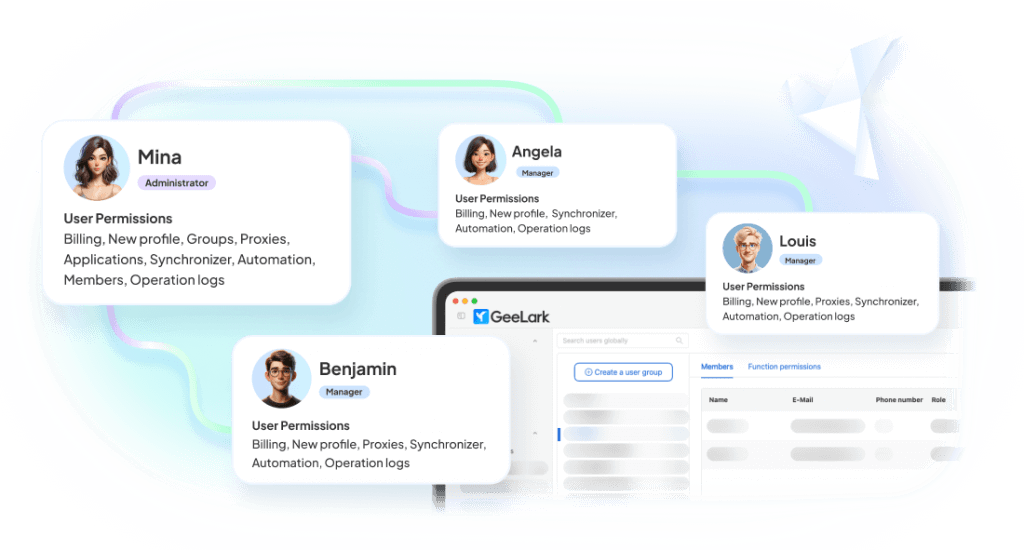
Assign profiles to team members
Admins can assign different cloud phone profiles to different team members based on platform, client, campaign, or account group.
Control permissions
Set team access and permissions to protect account assets while allowing operators to complete daily workflows.
Work from anywhere
Team members can access assigned cloud phones remotely without relying on one office computer or a physical phone farm.
Use cases for GeeLark as an Android emulator alternative
How social media teams scale with GeeLark
Related solutions

Learn more about Android emulators and cloud phones
Explore guides that compare Android emulators, cloud phones, online emulators, and APK tools, then choose the right setup for social media multi-account management.

Cloud Phone vs Android Emulator
Compare cloud phones and Android emulators across device identity, scaling, automation, proxy setup, and team collaboration.
Best Android Emulators for PC
Review popular Android emulators and learn when a cloud phone is a better fit for multi-account work.
Android Emulator Online
See how online Android emulators work and when persistent cloud phones are more practical.

Run APK Online
Explore tools for running APKs online and compare them with cloud phone workflows.

What Is a Cloud Emulator?
Understand cloud emulators, cloud phones, and the best use cases for each option.
FAQs
Get started in 3 simple steps
Sign up
Download
Log in to the App
Use GeeLark Cloud Phones Instead of Android Emulators
Move your mobile app accounts from local emulators to cloud-based Android environments built for account isolation, automation, and team collaboration.
