
CLOUD PHONE
Cloud phone for social media multi-account management
Create your account and explore GeeLark for free
- Real Android environments
- Built-in automation
- One account per cloud phone
- Team-based access

BUILT FOR TEAMS MANAGING MOBILE-FIRST ACCOUNT OPERATIONS
Social media teams
Growth agencies
Affiliate marketers
Ecommerce operators
App developers
CLOUD PHONE, DEFINED
What is a cloud phone?
A cloud phone is an Android device environment that runs on cloud infrastructure instead of a physical phone or a local computer. You can access it remotely, install mobile apps, configure network settings, and use it like an independent Android device.
With GeeLark, teams can create and manage multiple cloud phones from one dashboard for social media accounts, automation, app workflows, and team collaboration.
A mobile device in the cloud—not just another browser profile
Multi-account browsers are designed mainly for web-based accounts. Android emulators run locally and depend on your computer’s resources. A cloud phone gives you a remotely accessible Android environment built for native mobile apps and scalable device management.
Your computer
Remote access
|
GeeLark workspace
Central control
|
Isolated Android cloud phones
Independent environments
|
Native social apps
TikTok • Instagram • Facebook • Reddit • X
Scale mobile account operations without a physical phone farm
Physical phones work when you manage only a few accounts. As operations grow, device purchasing, charging, storage, handover, and maintenance quickly become difficult to manage. GeeLark replaces much of that hardware-heavy workflow with Android cloud phones that can be launched, organized, shared, and operated from one workspace.
Before · Physical phones
Cables
Charging stations
Manual handovers
Local maintenance
Purchase · charge · store · hand over · repair — repeat.
With · GeeLark dashboard
Cloud phone groups
Remote access
Team permissions
Automation
One workspace · every device · every account · every teammate.
Launch devices on demand
Create Android cloud phones without purchasing additional hardware.
Access assigned cloud phones remotely
Operate your assigned cloud phones from your computer without handling physical devices.
Keep account environments separate
Assign a dedicated cloud phone, proxy, app data, and workflow to each account.
Collaborate without device handovers
Give team members access to the cloud phones they need.
Run every part of your mobile account operation from one workspace
Set up account environments, handle repetitive tasks, coordinate your team, and manage daily mobile account operations from one GeeLark workspace.
Set up separate environments for every account
Spin up isolated Android environments and group them by account, brand, region, or campaign—all from one dashboard.

Take repetitive account tasks off your team’s plate
Use templates and custom tasks that run on cloud phones—no scripts to maintain, no attended sessions.

Perform the same action across multiple phones at once
Mirror an action from one device to many. Great for supported bulk workflows and consistent setup steps.
Give each account its own network setup
Attach a dedicated proxy to each cloud phone with country, session, and rotation options.

Let teammates operate the accounts they’re responsible for
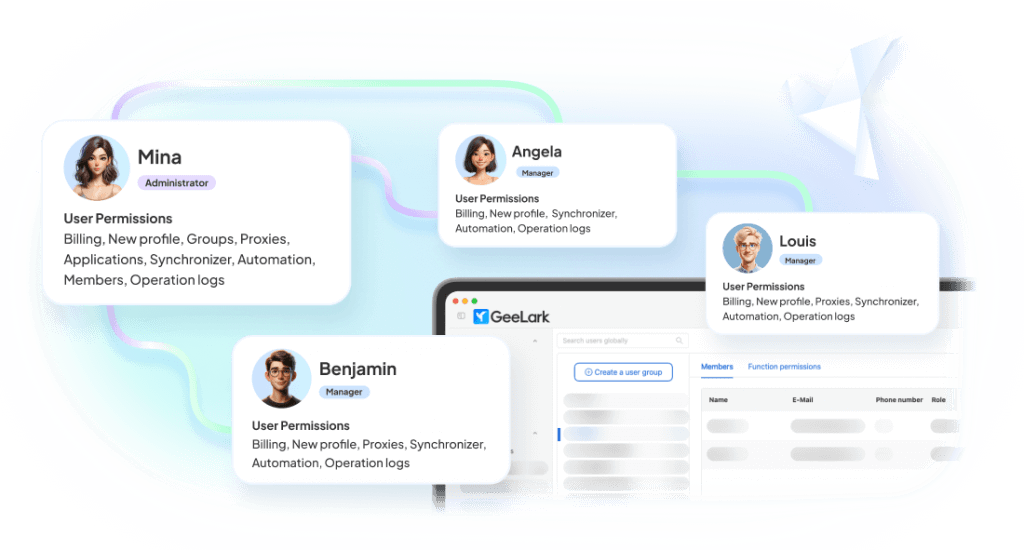
Give teammates access to the exact cloud phones and groups they need. Roles, permissions, and audit logs included.
Create content without leaving your account workflow
Generate images, videos, and campaign ideas tailored for TikTok, Instagram, Facebook, X, Reddit, and more—without leaving your GeeLark workspace.

Run mobile-first workflows across social platforms
Manage native mobile app workflows from dedicated Android cloud phones while keeping accounts, teams, and campaigns organized in one workspace.

A cloud phone for every TikTok account
Manage TikTok accounts across regions from isolated Android cloud phones—each with its own proxy and app data. Run supported content workflows without swapping SIMs or devices.
A cloud phone for every Instagram account
Run separate Instagram accounts on dedicated cloud phones. Assign proxies per region and let teammates operate the accounts they own.
A cloud phone for every Facebook account
Operate Facebook and Marketplace accounts from cloud phones. Automate outreach with Custom Tasks and keep every account in its own environment.
A cloud phone for every YouTube Shorts account
Manage YouTube Shorts accounts on Android cloud phones—native app workflows, dedicated proxies, and per-account isolation.
A cloud phone for every X account
Run X (Twitter) accounts in isolated Android environments. Combine automation templates with team collaboration to scale posting workflows.
A cloud phone for every Reddit account
Age and manage Reddit accounts on stable cloud phones. Group by subreddit strategy and share access with the operators who need it.
Start using cloud phones in four steps
Create cloud phones
Launch Android cloud phones for different accounts, brands, or campaigns.
Configure device environments
Set up proxies, locations, and device information before launch. Adjust settings anytime as your workflows evolve.
Connect accounts and collaborate
Log into social media accounts, organize cloud phones into groups, and assign permissions across your team.
Automate and scale operations
Use GeeLark’s automation tools to streamline daily account management and scale operations efficiently.
Use the GeeLark desktop app to manage your cloud Android environments.
Cloud phone vs physical phones, Android emulators, and multi-account browsers
The right setup depends on whether your workflow is based on native mobile apps, local testing, physical hardware, or browser-based accounts.
|
Comparison |
GeeLark Cloud Phone |
Physical Phone Farm |
Android Emulator |
Multi-account Browser |
|---|---|---|---|---|
|
Mobile app support |
Runs Android apps in cloud phones |
Runs apps on real phones |
Depends on local emulator compatibility |
Mainly browser-based |
|
Device management |
Centralized dashboard |
Manual device handling |
Local machine dependent |
Browser profile management |
|
Scaling |
Launch many cloud phones quickly |
Requires buying and maintaining phones |
Limited by computer resources |
Scales web profiles, not mobile apps |
|
Team collaboration |
Built for shared access and workflows |
Difficult to manage remotely |
Not ideal for teams |
Usually web-focused |
|
Automation |
Synchronizer, templates, API workflows |
Manual or custom setup |
Custom scripts needed |
Web automation focused |
|
Best for |
Social media multi-account operations |
Small offline phone setups |
App testing or light usage |
Web account management |
Choose a cloud phone when:
You need native mobile apps, remote access, separate environments, team collaboration, and scalable workflows.
Choose an emulator when:
You mainly need local app testing.
Choose a multi-account browser when:
Your workflow is primarily browser-based.
RESOURCE HUB
Learn more about cloud phones
Short, practical explainers on how cloud phones work, how they compare to other setups, and how teams use them per platform.
What Is a Cloud Phone? A Complete Guide to Social Media Accounts Setup
A cloud phone is an Android phone that runs in the cloud and can be accessed remotely through a browser or a dedicated app. But can it become part of your social media infrastructure? What…Cloud Android Explained: What It Is and How It Works
If you need to manage different mobile profiles, whether for app testing or social media operations, you’ve probably considered getting multiple Android devices. However, while this might be feasible for a few profiles, it’s not…What Is a Phone Farm? Uses, Risks, and Cloud Alternatives
A phone farm may look simple from the outside: many phones running many tasks at the same time. But in real business use, it is more than a pile of devices. You also need to…


Cloud Phones for TikTok: How They Work + 5 Use Case
Most people don’t need a cloud phone for TikTok. If you manage only one or two accounts, your own phone is usually enough. Cloud phones become useful when you need to run multiple TikTok accounts,…Cloud Phone for Instagram: 4 Practical Use Cases
Cloud phones are not only useful for TikTok. They can also make it easier to manage multiple Instagram accounts. This guide covers four practical ways to use a cloud phone for Instagram. You will see…How to Use a Cloud Phone for Facebook
Many Facebook operators still do a lot of their work on mobile. They keep personal accounts signed in, browse Feed and Reels, engage with content, and publish posts from the Facebook app. But as the…


Cloud Phone vs Android Emulator: Which Is Better for Social Media Accounts? (2026)
Have you ever had to manage multiple social media accounts? For mobile-first platforms like TikTok and Instagram, using phones to manage accounts often feels like the more natural choice. After all, these platforms are built…Cloud Phone vs Physical Phone Farm: Which Setup Wins in 2026?
If you’re looking into phone farms, you’re probably asking a simple question: should you actually build one, or is there a better way to run mobile accounts at scale? A few years ago, the answer…Cloud Phone vs Multi-Account Browser: Which One Should You Use?
If most of your work happens inside native apps like TikTok, Instagram, or other social media apps, a cloud phone is usually the better fit. But if your workflow also includes Meta Business Suite, ad…


RELATED TOPICS
Customer results
How teams scale with GeeLark cloud phone
Explore workflows and results described in GeeLark’s published customer stories. Figures relate to individual cases and are not independently verified or guaranteed outcomes.
Learn how to manage multiple social media accounts with cloud phones
FAQs
Get started in 3 simple steps
Ditch the hardware and go cloud
Start using GeeLark cloud phones to manage mobile-first social media accounts without building a physical phone farm.
