
Create and manage multiple Pinterest accounts safely
Real Android environments
One account per cloud phone
Built-in automation
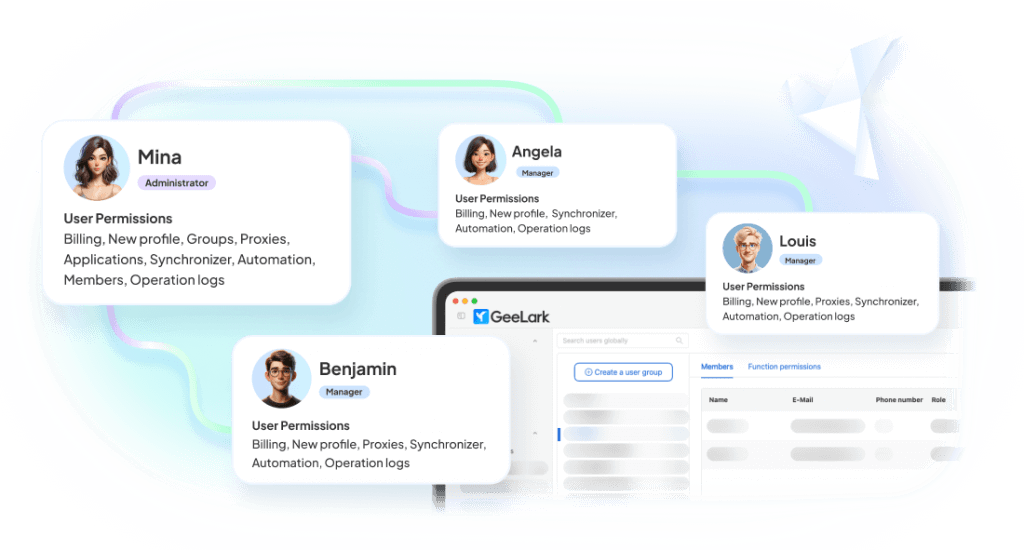
Team-based access

BUILT FOR TEAMS MANAGING MOBILE-FIRST ACCOUNT OPERATIONS
Social media teams
Growth agencies
Affiliate marketers
Ecommerce operators
App developers
Can you have multiple Pinterest accounts?
Yes. Pinterest allows users to create an additional account, but each separate Pinterest account should use a different email address. Pinterest also lets users link and switch between a limited number of accounts, which is useful for personal or small business use.
When do you need more than one Pinterest account?
Multiple Pinterest accounts are useful when you manage different brands, websites, product categories, content niches, client projects, or regional audiences. For example, an ecommerce team may separate home decor, fashion, beauty, and DIY stores into different Pinterest accounts. An agency may run one account per client. An affiliate marketer may use different accounts for different content verticals.
Pinterest’s built-in account switching works for small-scale use. For larger operations, use separate environments for each account to avoid mixing cookies, sessions, device fingerprints, and team activity.
Why separate Pinterest account environments matter
As you manage more Pinterest accounts, keeping each account in its own environment helps organize workflows, separate app data, and reduce operational mistakes across brands, clients, or projects.
Account linking risks
Logging into multiple Pinterest accounts from the same browser, device, or IP increases account association risks.
Shared environments
Reusing browsers, fingerprints, or network settings makes unrelated accounts appear connected.
Content management overhead
Managing Pins, boards, and publishing schedules across multiple accounts quickly becomes inefficient.
Team collaboration friction
Sharing credentials between teammates creates security risks and complicates account management.
Scaling becomes manual
Growing from a few Pinterest accounts to dozens increases operational overhead and slows your workflow.
Pain points become a single workspace
Cloud phones on demand
One clean environment per account
Role-based workspace access
Centralized workspace
How GeeLark cloud phones work for Pinterest
GeeLark lets your team run multiple Pinterest accounts in isolated Android cloud phones. Instead of managing every account on the same browser or device, each Pinterest account operates in its own mobile environment with dedicated app data, login session, device fingerprint, proxy, and team permissions.
Your computer
Remote access to all Pinterest account environments
|
GeeLark workspace
Central control for Pinterest accounts, cloud phones, proxies, teams, and automation
|
Isolated Android cloud phones
One cloud phone environment for each Pinterest account or account group
|
Pinterest app
Manage Pins, boards, business accounts, and publishing workflows in isolated mobile environments
One workspace, six working surfaces
Everything an operator touches during a normal day, in a single product.
Create and organize Android cloud phones
Spin up isolated Android environments and group them by account, brand, region, or campaign—all from one dashboard.

Automate repetitive mobile workflows
Use templates and custom tasks that run on cloud phones—no scripts to maintain, no attended sessions.

Repeat actions across multiple cloud phones
Mirror an action from one device to many. Great for supported bulk workflows and consistent setup steps.
Configure network environments by account
Attach a dedicated proxy to each cloud phone with country, session, and rotation options.

Assign access without sharing devices
Give teammates access to the exact cloud phones and groups they need. Roles, permissions, and audit logs included.
Create social-ready content with AI
Generate images, videos, and campaign ideas tailored for Pinterest and more—without leaving your GeeLark workspace.

COMPARISON
GeeLark vs traditional multi-account solutions
Where each approach holds up, and where it stops scaling.
|
Criteria |
GeeLark |
Physical Phones |
Android Emulators |
Browser Profiles |
|---|---|---|---|---|
|
Scalability |
Instantly add cloud phones from one dashboard |
Limited by purchased hardware |
Limited by local CPU and RAM |
Easy to create, but tied to one computer |
|
Environment isolation |
Dedicated device, storage, and network for every account |
One physical device per account |
Shared system resources and fingerprints |
Browser isolation only; no mobile environment |
|
Team collaboration |
Role-based access with centralized management |
Requires handing over devices |
Restricted to a single workstation |
Credentials are commonly shared |
|
Automation |
Built-in automation and scheduled workflows |
Mostly manual or requires additional scripting |
Script-based with ongoing maintenance |
Limited to browser automation |
|
Hardware dependency |
None — fully cloud-based |
Requires devices, SIMs, charging, and storage |
Requires a high-performance computer |
Requires a powerful desktop |
|
Mobile app fidelity |
Native Android cloud environment |
Native Android device |
Simulated Android environment |
Browser-only experience |
Choose a cloud phone when:
You need native mobile apps, remote access, separate environments, team collaboration, and scalable workflows.
Choose an emulator when:
You mainly need local app testing.
Choose a multi-account browser when:
Your workflow is primarily browser-based.
CUSTOMER RESULTS
What changes after the switch
How teams scale with GeeLark cloud phones.
Kickstart with our AI-powered templates
Check our templates to launch your Pinterest automation
Get started in 3 simple steps
Sign up
Download
Log in to the App
FAQs
Run multiple Pinterest accounts without scattered devices
Create a cleaner Pinterest operation with isolated cloud phones, proxy control, team permissions, automation templates, and one dashboard for all your accounts.
