
Proxidize: Pairing Mobile Proxies with Cloud Phones for Maximum Efficiency
Summarize this article with your preferred AI
In digital marketing and web scraping, keeping device environments and network connections organized is important. GeeLark cloud phones and Proxidize’s mobile proxies work together to give each cloud phone profile its own mobile network connection. This setup can support multi-account marketing workflows and access to mobile-only content. Proxidize’s 4G LTE/5G proxies, combined with GeeLark’s cloud-based Android environments, provide a practical setup for teams managing mobile workflows.
Why Mobile Proxies Matter?
Proxidize’s mobile proxies use IP addresses from cellular networks, which can be useful when a workflow needs a mobile connection. When paired with GeeLark cloud phones, each profile can be configured with its own proxy. This helps teams maintain consistent device and network settings for authorized multi-account social media campaigns or mobile-focused data collection. Proxy use does not guarantee that an account will avoid review or restrictions, so users should still follow platform rules.
Proxidize: Your Mobile Proxy Solution
Proxidize offers high-quality 4G LTE/5G mobile proxies that support both HTTP and SOCKS protocols. Additionally, they feature rotating mobile proxies and a centralized proxy management software. With their advanced software, users have access to a device list of modems and proxy lists with the ability to create proxy pools. Furthermore, Proxidize’s software allows for SMS reading and forwarding.
There are several other advantages that set Proxidize apart:
- Automated HTTP(s) Proxy Creation
- Cloud Proxy Management Dashboard
- Manual and Automated Proxy IP Rotation
- Traffic, Speed, and Bandwidth Analysis
- 24/7 Support (Enterprise Plan Only)
- Community Support
- And more!
To accommodate different needs, there are three software pricing plans, which include Personal, Business, and Enterprise, along with a free plan for those just starting out. Besides software, Proxidize offers hardware which comes with all the necessary components. Additionally, you can also make your own mobile proxies using an Ubuntu device, a Raspberry Pi, or an Android device along with their software.
Proxidize’s Services
Proxidize offers three key services: mobile proxies, hardware, and a cloud platform to build your own proxies. For instance, you can purchase mobile proxies which include features such as HTTP and SOCKS, 5–25 Mbps speeds per proxy, access to 50+ locations, premium support, rotation URL API, near 100% uptime, and instant delivery. For as low as $59 per month per proxy, you can get high-quality US mobile proxies. Alternatively, you can purchase Proxidize hardware kits which come with a Proxidize SX2 Micro Server, MX2 USB Modems, a Proxidize HX1 USB Hub, and cables and adapters.
Moreover, you can leverage the Proxidize Cloud Platform, which allows you to use an Ubuntu device, a Raspberry Pi, or an Android 7+ device as your hardware for mobile proxies. Meanwhile, Proxidize provides extensive documentation to help you set up your own device as a modem.
How to Set Up Proxidize in GeeLark?
To begin, launch your GeeLark application and click on “Proxies” located on the left side under Groups.

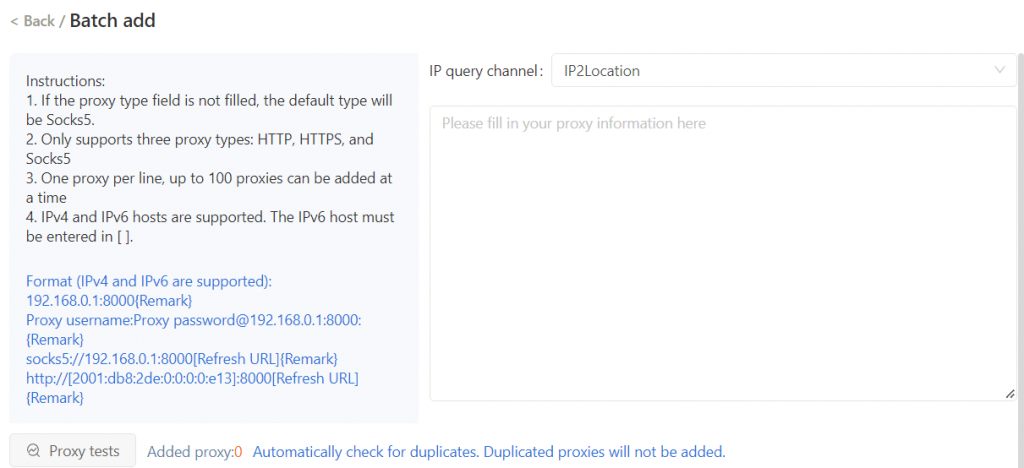
Next, go to the “Proxy List” tab and click on “Add Proxy”.
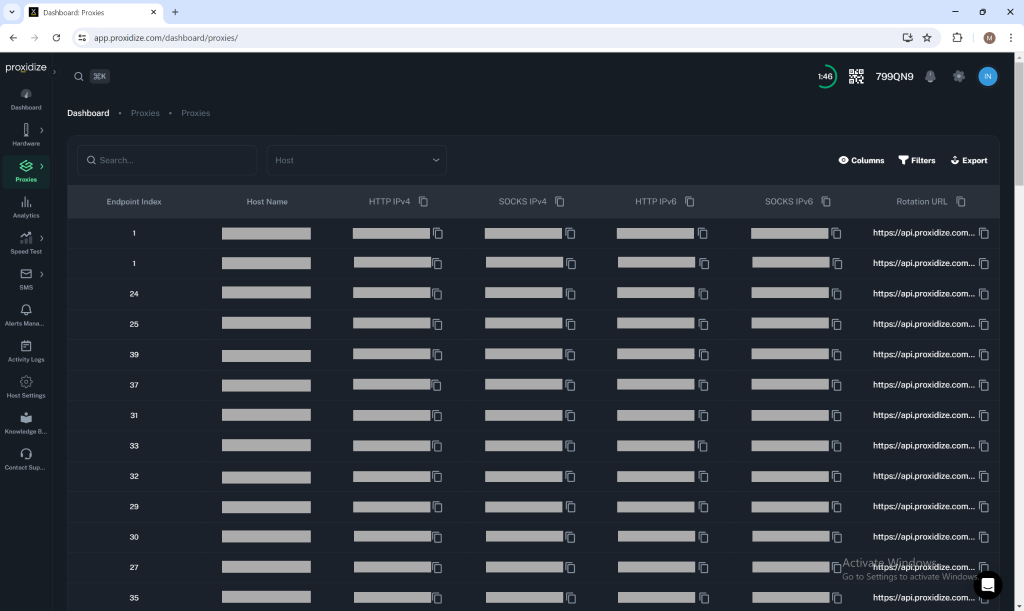
Then, head to your Proxidize dashboard to get your proxy information. There are two ways to get this information: either through the proxy builder or through proxies gained via a modem. You may choose an individual proxy or create a proxy pool to use.
Once you have your proxy or list of proxies, paste it into the list on GeeLark. It’s important to remember that you can use up to 100 proxies. Each proxy should follow the necessary format allowed by GeeLark, which is username:password@hostname:port. Fortunately, Proxidize’s proxies follow this format by default.
After pasting your proxies, test them to ensure they are all working accordingly. Following confirmation of their functionality, click “Okay” to proceed.
To further enhance your setup, create a new profile by pressing the “New Profile” button on the left side. Enter all the necessary information for your new profile; at the Proxy Settings section, click on saved proxies and choose one of the many proxies available. Alternatively, you could skip the steps stated above and manually enter your proxy information here. However, with the saved proxies option, you can save a significant amount of time and utilize a proxy pool if you have one ready.
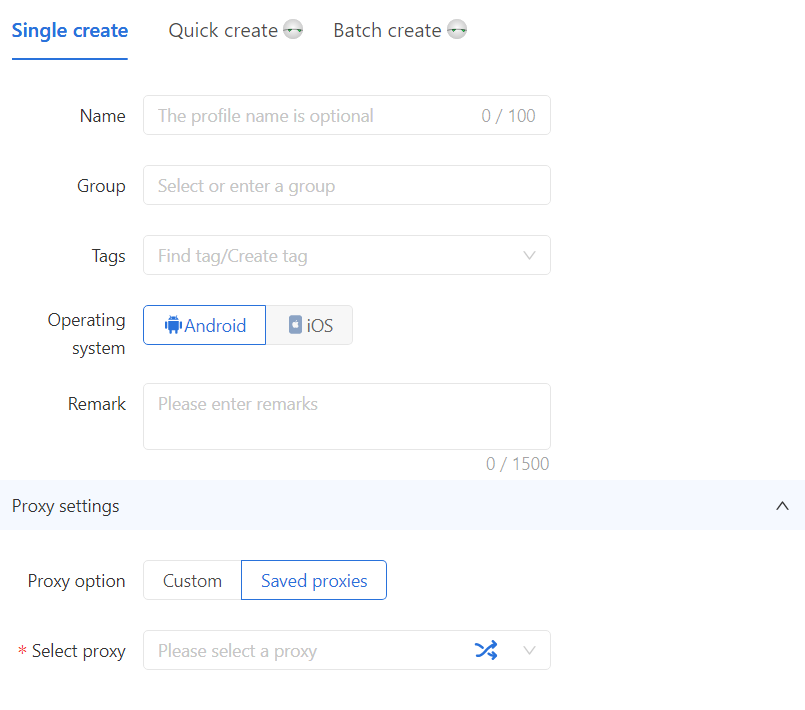
Finally, click “Okay” to finish setting up the profile, then launch the cloud phone with its assigned mobile proxy.
Exclusive Offer for GeeLark Customers
By using Proxidize with GeeLark, you can combine mobile proxy connectivity with cloud-based Android environments in one workflow. Proxidize also offers GeeLark customers a discount code. Use code “GeeLark” to receive a 50% discount on your first month with Proxidize.
Try out Proxidize today and experience the difference!