
Multi-account management for browser and cloud phone workflows

Cloud phone and browser profiles in one workspace
Proxy, tag, group, and team access controls
No-code automation, synchronizer, and API options
Built for social, ecommerce, testing, and ad verification workflows
Why multi-account management fails when profiles are not isolated
Most multi-account problems start when different accounts share the same device environment, browser fingerprints, cookies, IP patterns, app data, or team login habits. A simple spreadsheet or a set of Chrome profiles may work for a few accounts, but it becomes fragile once a team needs to manage dozens or hundreds of profiles across web platforms and mobile apps.
Shared browser data
Cookies, local storage, cached sessions, and browser fingerprints can overlap when accounts are opened from the same browser setup. This makes accounts harder to separate and harder to audit.
Mixed device signals
Mobile-first platforms often evaluate device-level signals, app behavior, and hardware-like identifiers. Browser-only tools may not be enough for workflows that depend on native Android apps.
Proxy and location mistakes
Traditional Android emulators are usually tied to one local machine. This makes it harder for agencies, remote teams, and social media operators to assign accounts, share access, and manage workflows together.
Team access without controls
When multiple operators share passwords, devices, or manual notes, it becomes difficult to know who changed a profile, which proxy was used, and whether an account was opened in the right environment.
How GeeLark separates accounts across web and mobile workflows
GeeLark gives each account its own managed environment. For web-based workflows, teams can use isolated browser profiles. For mobile-native workflows, teams can use Android cloud phone profiles. Both profile types can be organized in one dashboard with tags, groups, proxies, automation tools, and team permissions.
Cloud phone profiles for mobile-native apps
Use cloud phone profiles when the account workflow depends on a native Android app, mobile device behavior, app installation, or mobile-only features. Each profile runs in a separate Android environment in the cloud, so operators do not need to buy, reset, or maintain physical phones for every account.

Browser profiles for web-based accounts
Use browser profiles when the workflow happens mainly in a web dashboard, ecommerce backend, webmail, ad platform, or website. Each browser profile keeps sessions, cookies, and fingerprint settings separated, helping teams avoid accidental overlap between accounts.

One workspace for profile, proxy, and team control
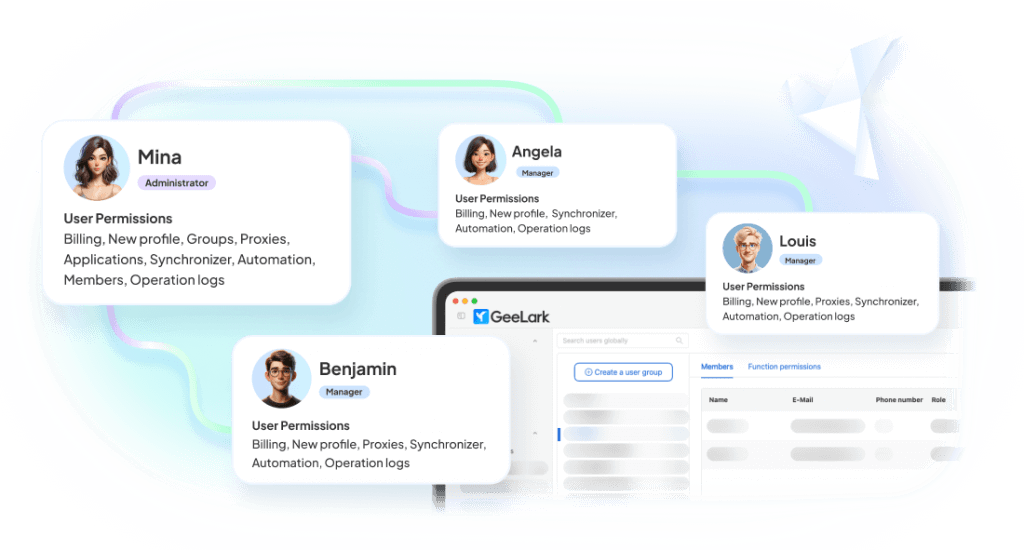
GeeLark brings browser profiles and cloud phone profiles into the same workspace. Teams can group accounts by client, platform, operator, region, or workflow stage, then assign access and launch the right environment without switching tools.
Cloud Phone vs Browser Profile: which one should you use?
The right profile type depends on where the account is operated and what signals the platform relies on. Use this table as a starting point before creating profiles in GeeLark.
| Workflow | Recommended profile | Why | Example platforms |
|---|---|---|---|
| Native mobile app operations | Cloud Phone Profile | Runs inside a separate Android environment and supports app-based workflows | TikTok, Instagram, Snapchat, Telegram, mobile games |
| Web dashboard operations | Browser Profile | Keeps browser sessions, cookies, and fingerprint settings separated | Amazon, eBay, Shopify, ad platforms, webmail |
| Mixed web + app workflow | Both | Use browser profiles for dashboards and cloud phones for app actions | Ecommerce + TikTok Shop, social campaigns, app testing |
| Team account operations | Browser or Cloud Phone Profile with groups and permissions | Keeps access organized by operator, client, platform, or workflow stage | Agencies, media buying teams, ecommerce teams |
| High-volume repetitive tasks | Profile + Automation | Use templates, synchronizer, no-code scripts, or API depending on workflow complexity | Account warmup, posting, app testing, QA tasks |
This recommendation is not a guarantee against platform restrictions. Account quality, user behavior, content patterns, proxy quality, and each platform’s rules still affect account outcomes.
Core features for scalable multi-account operations
Profile isolation for each account
Keep account environments separated with dedicated browser profiles or Android cloud phone profiles. Each profile can hold its own session, configuration, proxy, app setup, and operational context.
Proxy management tied to profiles
Assign proxies at the profile level so operators do not need to manually switch network settings before each session. This reduces mistakes caused by shared proxies, wrong locations, or inconsistent login patterns.
Team access and profile organization
Organize profiles by group, tag, platform, client, or operator. Give team members access to the profiles they need and keep daily work structured as the number of accounts grows.
Automation for repeatable workflows
Use synchronizer, no-code scripts, automation templates, or API integrations to reduce repetitive manual work. GeeLark is best used when automation is paired with profile isolation, review, and gradual scaling.
Start faster with AI-powered templates
Use ready-made templates for social and operational workflows. Customize them with AI-generated content and automate posting or tasks without building from scratch.


Multi-account workflows by platform type


Risk, compliance, and responsible use
GeeLark helps reduce risks caused by mixed environments, shared sessions, manual proxy mistakes, and unmanaged team access. However, no multi-account tool can guarantee account safety or prevent platform restrictions in every situation.
What GeeLark can help with
✅ Separating account environments with browser profiles or cloud phone profiles
✅ Reducing accidental session, cookie, proxy, and device-environment overlap
✅ Organizing profile access for teams and operators
✅ Making repetitive workflows easier to run and review
What still depends on your operation
- Whether your use case follows each platform’s terms and local regulations
- The quality and consistency of your account behavior
- The quality, region, and stability of your proxies
- Your content quality, posting frequency, and engagement patterns
- Platform-specific policies, reviews, and enforcement changes
Recommended operating principles
Use GeeLark for legitimate business, testing, research, and team workflows. Keep accounts organized, avoid mixing unrelated profiles, start automation gradually, monitor account health, and review the rules of each platform before scaling.
RESOURCE HUB
Guides for building a safer multi-account setup
Start, manage, and scale multiple accounts — all in one place
How to Manage Multiple TikTok Accounts: A Practical Method
Managing multiple TikTok accounts is one part of the broader challenge of managing multiple social media accounts. The real questions are where each account should run, how its network should be configured, what each account…How to Create and Run Multiple Facebook Accounts: The Ultimate Guide
Imagine this: Your e-commerce business is growing fast. To get more customers, you decide to run more ads or create new Facebook profiles for different markets. Everything looks great — until you wake up one…Can I Have Multiple Instagram Accounts? The 2026 “No-Ban” Playbook
Instagram is no longer just a photo-sharing app—it is a global marketing powerhouse. According to a 2025 update from Meta, the platform now has over 3 billion monthly active users worldwide. More importantly for marketers,…





Can’t Access Instagram? Learn How to Get Instagram Unblocked
Wondering whether your access to Instagram is restricted? If you’re met with endless spinning or an error message when you open the app, odds are, you’re blocked from accessing the platform. Instagram blocks are especially…What is a Reddit Shadow Ban? Everything You Need to Know
If you’ve been posting to Reddit without getting any engagement, you’re probably questioning the quality of your content. However, the problem might not be your quality. Sometimes posts get no comments or votes due to…Reddit IP Ban Explained: Causes, Fixes, and Prevention
Key Takeaways Are you unable to load Reddit when connected to a specific network? You’re probably dealing with an IP ban. While Reddit may send notifications like “Your IP has been temporarily blocked,” IP bans…


What Is a Cloud Phone? A Complete Guide to Social Media Accounts Setup
A cloud phone is an Android phone that runs in the cloud and can be accessed remotely through a browser or a dedicated app. But can it become part of your social media infrastructure? What…What Is a Multi-Account Browser? A Beginner’s Guide
Multi-account browser might sound like a complex tech tool — but don’t worry, it’s not as scary as it sounds. This beginner-friendly guide will explain, in simple words, what a multi-account browser is, why people…Cloud Phone vs Multi-Account Browser: Which One Should You Use?
If most of your work happens inside native apps like TikTok, Instagram, or other social media apps, a cloud phone is usually the better fit. But if your workflow also includes Meta Business Suite, ad…


How to Manage Multiple Social Media Accounts: A Complete Guide
Managing multiple social media accounts gets messy fast. At first, it feels manageable. Then you find yourself jumping between accounts, devices, spreadsheets, content calendars, and team chats just to keep things moving. And the more…Multi-Account Management for Mobile and Browser Workflows
Managing multiple accounts gets harder when the work happens across more than one place. Some platforms work better on mobile. Others are easier to manage in a browser. Some need both. That means multi-account management…


See multi-account management in action
FAQs
How social media teams scale with GeeLark
Get started in 3 simple steps
Sign up
Download
Login in App
Build a cleaner multi-account workspace with GeeLark
Create separate browser and cloud phone profiles, assign proxies, organize accounts by workflow, and give your team a more reliable way to manage accounts at scale.
