
Profile Setup
Introduction
Cloud phones represent the next evolution in virtual mobile technology – fully functional Android environments hosted in the cloud rather than on physical hardware. GeeLark has pioneered the world’s first antidetect cloud phone solution, offering users the ability to create and manage unlimited virtual devices from a centralized dashboard. This comprehensive guide will walk you through the entire profile setup process, enabling you to leverage cloud phones for secure multi-account management, application testing, and marketing automation – all without investing in physical devices.
What Are GeeLark Cloud Phones?
GeeLark cloud phones are complete virtual Android devices that operate entirely in the cloud. Unlike traditional solutions, they provide:
- Full hardware simulation: Each cloud phone generates unique device fingerprints (IMEI, MAC address, etc.) indistinguishable from physical phones
- Native app support: Run actual Android applications (not just browser versions)
- Cloud-based infrastructure: Operates on actual hardware in data centers, not software emulation
- Independent environments: Each profile maintains separate network configurations and geographic locations
This architecture makes GeeLark fundamentally different from both antidetect browsers and Android emulators. As shown in GeeLark’s comparison guide, cloud phones provide superior performance and detection resistance.
The Profile Setup Process
Creating a New Profile
- Sign in to your GeeLark dashboard to get started.
- Navigate to Profiles → “New Profile”
- Select your preferred cloud phone provider

Basic Profile Configuration
Essential Settings:
- Profile Name: Use descriptive naming (e.g., “US_Marketing_Phone1”)
- Device Parameters:
- Screen resolution (select from presets or customize)
- Hardware identifiers (automatically generated)
- Device model/brand selection
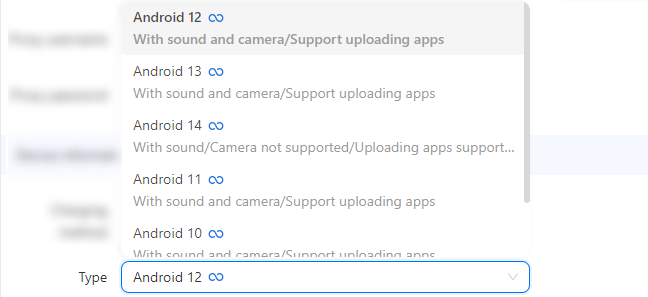
- Android Version Selection:
GeeLark offers multiple Android versions (10-14) with distinct advantages:
Network Configuration
Proxy Integration
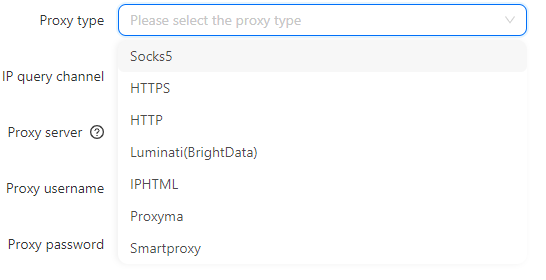
GeeLark supports all major proxy types:
- HTTP/HTTPS
- SOCKS5
- Residential/mobile proxies

Geographic Location Setup
Two configuration methods:
- Auto-match: Automatically aligns device location with proxy IP
- Custom: Manual region selection for precise targeting
Launching and Managing Your Cloud Phone
After completing setup:
- Select profile → Click “Start”
- Wait 1-2 minutes for system initialization
- Access through the web interface or mobile app
Experience an intuitive cloud-based phone interface that brings all your calling tools into a single, easy-to-navigate dashboard. Instantly access contacts, call history and voicemail, customize settings, and launch conference calls with just a few clicks. Real-time analytics and seamless integration with your CRM ensure you have the insights you need to stay connected and productive.
Advanced Profile Management
Organizational Tools
- Filter by Android version/type
- Sort by profile ID or creation date
- Time zone display in overview
Scaling Operations
- Clone existing profiles
- Bulk configuration updates
- Team collaboration features
Optimizing Performance
Troubleshooting Checklist
Application Management
- Apps install automatically during startup
- Access all apps via the app drawer (swipe up gesture)
- Update through the work profile Play Store
Cost Considerations
GeeLark’s pricing structure includes:
- Free tier: 60-75 minutes/month (based on plan)
- Pay-as-you-go: $0.007/minute ($1 daily cap)
- Bulk discounts: Available for enterprise users
Our pricing structure is designed to be flexible and transparent, offering tiered plans to suit businesses of every size. Each plan includes core features—such as unlimited projects, real-time analytics and 24/7 support—with optional add-ons like advanced security, custom integrations and dedicated account management. You can choose between monthly or annual billing, with discounted rates available on yearly commitments.
Conclusion
Setting up cloud phone profiles in GeeLark provides a revolutionary approach to mobile device management. By following this guide, you can:
- Create unlimited virtual Android devices
- Maintain complete separation between accounts
- Access full mobile functionality without hardware
- Scale operations with enterprise-grade tools
For organizations managing multiple accounts or testing mobile applications, GeeLark’s cloud phones offer an unbeatable combination of flexibility, security, and cost efficiency. Whether you’re an individual marketer or enterprise IT manager, GeeLark’s antidetect cloud phones provide the perfect solution for secure, scalable mobile operations in the cloud era.
People Also Ask
What is work profile setup?
Work profile setup is configuring a dedicated, managed container on a user’s device (typically Android) that hosts corporate apps and data separate from personal apps. IT admins deploy policies, encryption, and app controls within this profile while leaving the rest of the device under user control. It ensures data security, compliance, and easy app distribution without affecting personal privacy. Users switch between “Work” and “Personal” spaces seamlessly, and the IT team can remote‐wipe only the work container if needed.
Where is profile in settings?
On most devices “Profile” lives right in your main Settings menu:
- Android: Open Settings and tap your name/avatar at the top (or go to Accounts > Users & accounts).
- iOS: Launch Settings and tap the Apple ID banner (your name) at the very top.
- Windows: Open Settings (Win+I) > Accounts > Your info.
- macOS: Go to System Preferences > Users & Groups.
In many apps you’ll also find a “Profile” or “Account” entry in the side or bottom navigation.