
Create and scale multiple TikTok accounts with cloud phones
Real Android environments
One account per cloud phone
Built-in automation
Team-based access

BUILT FOR TEAMS MANAGING MOBILE-FIRST ACCOUNT OPERATIONS
Social media agencies
Manage client accounts, campaigns, and teams from one workspace.
Creator networks
Organize creator accounts and automate routine publishing tasks.
Affiliate & performance marketers
Scale campaigns with isolated accounts.
Ecommerce & TikTok Shop teams
Run multiple stores from one workspace.
App developers & growth teams
Test faster across multiple TikTok accounts.
THE PROBLEM
The challenges of managing multiple TikTok accounts
Account portfolios rarely break because of content. They break because the operating layer underneath — devices, environments, logins and people — was never designed for more than one account.
Constant account switching
Logging in and out of TikTok all day costs hours, breaks sessions and triggers extra verification.
Weak risk isolation
Shared devices, IPs and browser profiles leak signals between accounts that should stay unrelated.
Scaling breaks the process
What worked for five accounts collapses at fifty — onboarding, handover and QA all become manual.
Device management overhead
Physical phones need charging, storage, updates and someone physically present to use them.
Team collaboration friction
Credentials get passed around in chat, with no record of who accessed which account when.
Pain points become a single workspace
Cloud phones on demand
Role-based workspace access
Scheduled automation
One clean environment per account
WHY GEELARK
Why social media teams choose GeeLark
A product-level answer to multi-account operations, not a workaround stacked on top of a browser.
A dedicated cloud phone per account
Real Android in the cloud, always on, reachable from any desktop — no hardware to buy or babysit.
Independent account environments
Separate device profile, storage, app data and network path so accounts never share a footprint.
Automation for repetitive work
Warm-up, posting and routine actions run on schedule across a whole group of accounts.
Team collaboration built in
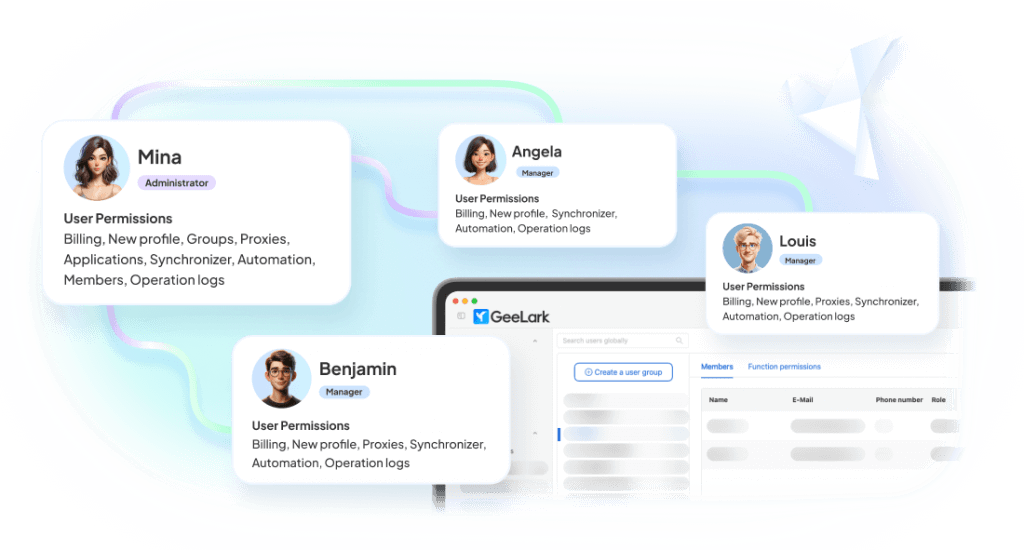
Invite operators, scope permissions per group and hand accounts over without sharing passwords.
One workspace, six working surfaces
Everything an operator touches during a normal day, in a single product.
Isolate every TikTok account with an Android cloud phone
GeeLark gives each account a real Android cloud phone environment where teams can install and use the TikTok app, manage account activity, and keep workflows separated.

Automate TikTok warmup, posting, and engagement
Managing multiple TikTok accounts manually becomes slow and inconsistent once your team grows beyond a few profiles. GeeLark helps turn repeated TikTok actions into reusable automation workflows.

Repeat actions across multiple cloud phones
Mirror an action from one device to many. Great for supported bulk workflows and consistent setup steps.
Bind a stable network path to each account
Attach proxies per device, check connectivity before use and keep regional consistency over time.

Assign access without sharing devices
Give teammates access to the exact cloud phones and groups they need. Roles, permissions, and audit logs included.
Create social-ready content with AI
Generate images, videos, and campaign ideas tailored for Pinterest and more—without leaving your GeeLark workspace.

BUILT-IN TEMPLATES
Start faster with TikTok automation templates
GeeLark provides ready-to-use automation templates for common TikTok multi-account workflows. Your team can use them to reduce repetitive work and keep account operations more consistent.

COMPARISON
GeeLark vs traditional multi-account solutions
Where each approach holds up, and where it stops scaling.
|
Criteria |
GeeLark |
Physical Phones |
Android Emulators |
Browser Profiles |
|---|---|---|---|---|
|
Scalability |
Instantly add cloud phones from one dashboard |
Limited by purchased hardware |
Limited by local CPU and RAM |
Easy to create, but tied to one computer |
|
Environment isolation |
Dedicated device, storage, and network for every account |
One physical device per account |
Shared system resources and fingerprints |
Browser isolation only; no mobile environment |
|
Team collaboration |
Role-based access with centralized management |
Requires handing over devices |
Restricted to a single workstation |
Credentials are commonly shared |
|
Automation |
Built-in automation and scheduled workflows |
Mostly manual or requires additional scripting |
Script-based with ongoing maintenance |
Limited to browser automation |
|
Hardware dependency |
None — fully cloud-based |
Requires devices, SIMs, charging, and storage |
Requires a high-performance computer |
Requires a powerful desktop |
|
Mobile app fidelity |
Native Android cloud environment |
Native Android device |
Simulated Android environment |
Browser-only experience |
Choose a cloud phone when:
You need native mobile apps, remote access, separate environments, team collaboration, and scalable workflows.
Choose an emulator when:
You mainly need local app testing.
Choose a multi-account browser when:
Your workflow is primarily browser-based.
CUSTOMER RESULTS
What changes after the switch
How teams scale with GeeLark cloud phones.
100+
TikTok accounts
≈0
Account suspensions
24/7
Automated publishing
Lower CPA
Lower acquisition costs
FAQs
Get started in 3 simple steps
Sign up
Download
Log in to the App
Start managing multiple TikTok accounts today
Create isolated cloud phone profiles, warm up new accounts, automate repeated TikTok workflows, and manage your team’s accounts from one workspace.
