
Run a cloud phone farm without physical devices

No physical devices
Replace racks, cables, batteries, and local maintenance
Isolated Android phones
Give each account its own cloud phone environment
Proxy control
Assign network and location settings per cloud phone
Automation ready
Use Synchronizer, RPA, and API workflows to manage repetitive mobile operations
What is a phone farm?
A phone farm is a group of mobile devices or mobile environments used to run mobile-first workflows at scale. Traditional phone farms rely on physical Android phones, racks, hubs, cables, and local maintenance. Today, many teams replace physical devices with cloud phone farms, where each Android environment can be created, managed, isolated, and automated remotely.
Why physical phone farms are hard to scale
😫 Hardware maintenance
Physical phone farms require ongoing maintenance. Batteries age, screens fail, cables break, devices overheat, and Android versions drift over time. The larger the farm becomes, the more time teams spend keeping devices online instead of running the actual workflow.
⚙️ Manual setup and recovery
Every new device needs apps, account setup, network configuration, labels, and documentation. When a device fails or loses access, teams often need to rebuild the environment manually, which slows down recovery and increases operating costs.
📱 Limited remote access
Physical devices are tied to local hardware. This makes it harder for distributed teams to access phones, share work, control permissions, or manage urgent tasks without someone near the device rack.
💰 Scaling costs
A phone farm is not just the cost of phones. Teams also pay for racks, hubs, power, routers, space, replacement devices, proxy setup, monitoring, and operator time. As the farm grows, these hidden costs become harder to control.
Physical Phone Farm vs Cloud Phone Farm
| Dimension | Physical phone farm | GeeLark cloud phone farm |
|---|---|---|
| Setup | Buy devices, racks, hubs, cables | Create cloud phones in minutes |
| Maintenance | Batteries, overheating, repairs | Managed cloud infrastructure |
| Scaling | Requires more hardware | Add more cloud phones on demand |
| Account isolation | Depends on device and network setup | Separate Android environments and device fingerprints |
| Proxy control | Manual or fragmented | Proxy setup per cloud phone |
| Automation | Requires external scripts/tools | Synchronizer, RPA, templates, API |
| Team access | Hard to share securely | Dashboard and team collaboration |
For teams that need mobile environments at scale, a cloud phone farm removes the hardware burden while keeping the parts that matter: isolated Android environments, account separation, proxy control, automation, and centralized management.
How GeeLark replaces a traditional phone farm
Instead of managing racks of Android devices, cables, power supplies, and manual workflows, GeeLark gives you everything needed to run a cloud phone farm from one dashboard.Real Android cloud phones
GeeLark provides cloud-based Android phones that work like real mobile environments. You can run mobile apps, keep sessions, manage accounts, and access each cloud phone remotely without buying or maintaining physical devices.

Independent device environments
Each cloud phone has its own Android environment and device profile. This helps teams keep accounts separated and reduce environment overlap when managing many mobile workflows.

Proxy and location settings
Assign proxy settings to different cloud phones based on account, region, campaign, or workflow. This gives teams more control over network environments than a local device rack.

Bulk management tools
Manage multiple cloud phones at once. Teams can launch phones, install apps, adjust settings, and perform repeated operations without handling each device manually.

Automation & RPA workflows
GeeLark offers complete automation for everyone. Choose from synchronizer, no-code script builder, or API integrations to manage accounts efficiently and securely at any scale.
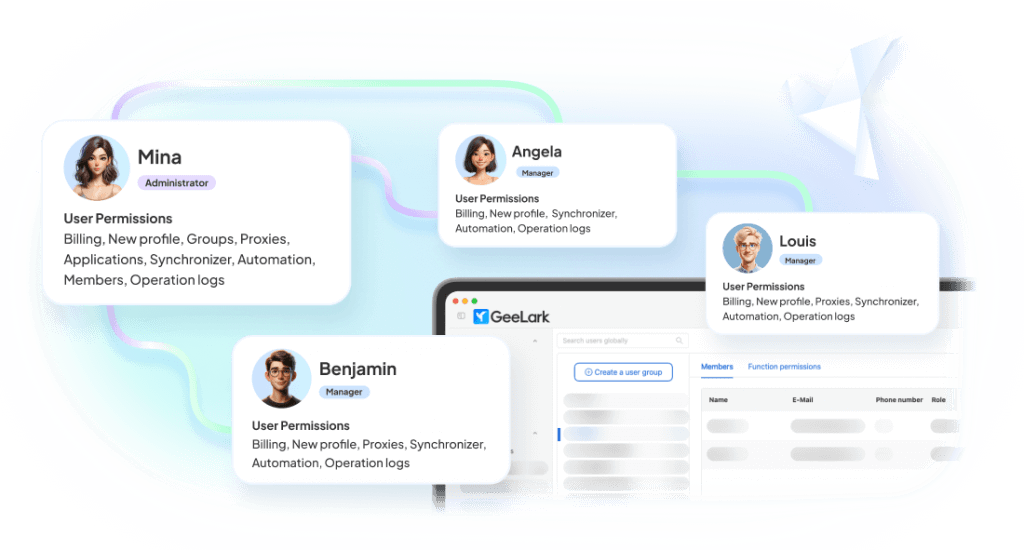
Team access & collaboration
Give team members remote access to the cloud phones they need. Instead of passing physical devices between operators, teams can collaborate from one platform with clearer access and workflow control.
What can you use a cloud phone farm for?
Social media multi-account management
Manage TikTok, Instagram, Facebook, X, Reddit, and other mobile-first accounts in separate Android cloud phones. Each account can have its own environment, apps, proxy settings, and workflow history.
Related solutions

FAQs
How social media teams scale with GeeLark
Get started in 3 simple steps
Sign up
Download
Log in to the App
Ditch the hardware and run your phone farm in the cloud
Create isolated Android cloud phones, assign proxies, automate repetitive workflows, and manage your mobile operations from one dashboard with GeeLark.
