
Create multiple Roblox accounts


Lower the costs
Manage Roblox accounts without physical devices
Manage multiple Roblox accounts without physical devices using GeeLark’s isolated cloud phones, streamlining account control, scaling operations, and ensuring secure, automated remote access.
Cloud phones
GeeLark provides access to cloud-based Android phones that operate just like real devices.
Unique profiles
Each profile is linked to a unique cloud phone, ensuring a distinct online identity.

Proxy configuration
While GeeLark doesn’t provide built-in proxies, we support configuration of all types of proxies.

If you manage multiple social media accounts with native apps, GeeLark can be your savior! This allows you to use multiple “phones” from a single PC, synchronize repeated workflows, and deploy automation.
Hitesh Sant
Business technology expert at Geekflare
Centralized control
Run as many Roblox accounts as you need
Run multiple Roblox accounts effortlessly with GeeLark’s cloud phones; each account uses a unique IP and isolated environment for secure, scalable account management.

Scale quicker
Make multiple roblox accounts easier with automation
Streamline and securely manage multiple Roblox accounts with Geelark.com’s compliant automation tools, saving time while ensuring account safety, platform compliance, and reliable performance.
GeeLark AI & AIGC
AI-powered workflow
GeeLark’s AI-powered workflow for Roblox streamlines asset creation, scripting, and optimization—accelerating game development while improving quality, discoverability, and player engagement on Geelark.com.

Synchronizer
The synchronizer replicates actions performed on one profile across all other open profiles.

RPA
Use pre-built templates for quick automation, or create custom workflows using RPA.
GeeLark AI
Create captivating content faster with GeeLark AI. Easily edit videos and generate captions, so you can post without delay.
Team collaboration
Share Roblox accounts with your team
Securely share Roblox accounts with your team via geelark.com, assign roles and permissions for centralized management, activity monitoring, and seamless collaborative control.

Create and manage multiple Roblox accounts without bans
Explore multi-account management on other platforms
Frequently asked questions
Is it legal to have multiple Roblox accounts?
Yes, it is legal to have multiple Roblox accounts, as long as you adhere to Roblox’s terms of service. Each account must be used for legitimate purposes, and players should avoid any behavior that may be considered spammy or abusive. Maintaining separate accounts for different games or experiences is common among users.
How many Roblox accounts can I create with GeeLark?
With GeeLark, you can create and manage multiple Roblox accounts efficiently and securely. Our cloud phone service enables you to operate each account independently, minimizing the risk of detection or suspension. Here are some key benefits:
- Unlimited Accounts: There is no strict limit on the number of Roblox accounts you can create with GeeLark, allowing you to scale your gaming experience as needed.
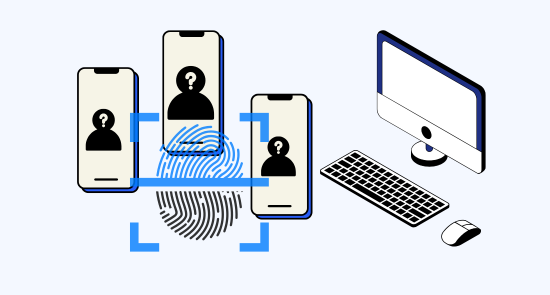
- Unique Digital Identities: Each cloud phone comes with its own digital fingerprint, ensuring that your accounts remain distinct and unlinked.
- Enhanced Security: Our advanced antidetect solutions help protect your accounts from being flagged by Roblox, allowing for safe management of multiple profiles.
- Convenient Access: Manage all your accounts from a single interface without the need for multiple physical devices.
Will my Roblox accounts get banned using GeeLark?
Using GeeLark for managing your Roblox accounts significantly reduces the risk of bans by providing a secure and isolated environment for each account. Our cloud phone service offers unique digital fingerprints, ensuring that your accounts appear distinct to the Roblox platform. This minimizes the chances of being linked or flagged for suspicious activity. Additionally, with the ability to configure different proxies, you can further enhance your account’s security and anonymity. By adhering to best practices and maintaining separate activities for each account, you can enjoy a seamless Roblox experience without the worry of account suspension.
Managing multiple Roblox developer accounts is streamlined with GeeLark’s innovative cloud phone service. Our platform offers:
- Unique digital identities for each account, preventing them from being linked.
- Remote access through dedicated Android devices, ensuring security and privacy.
- Efficient account management from a single interface, eliminating the need for physical devices.
- Automation tools to simplify tasks like updating games and managing user interactions.
With GeeLark, you can confidently manage your Roblox developer accounts without the risk of suspension or detection.
What type of proxies work best for Roblox accounts?
For managing Roblox accounts, residential proxies are highly recommended as they provide a real IP address, making your account appear as a genuine user. Additionally, rotating proxies can enhance security by changing your IP frequently, reducing the risk of detection. GeeLark seamlessly integrates with various proxy types, ensuring optimal performance for your Roblox management needs.
How do I switch between multiple Roblox accounts?
Switching between multiple Roblox accounts can be streamlined with the help of GeeLark’s cloud phone solutions. Our platform enables you to manage each account in a unique environment, ensuring they remain distinct and secure. By utilizing GeeLark, you can:
- Access separate profiles: Each Roblox account can be operated from its own cloud phone, preventing any linking or cross-detection.
- Utilize unique device fingerprints: This feature minimizes the risk of account bans and enhances your privacy.
- Seamlessly switch accounts: Enjoy a user-friendly interface that allows you to manage multiple accounts effortlessly without the need for physical devices.
Is GeeLark compatible with all platforms for Roblox?
GeeLark is designed to enhance your Roblox experience by providing a seamless mobile antidetect solution. While it primarily focuses on managing accounts through cloud phones, it is compatible with various platforms that support Roblox. This flexibility allows users to maintain privacy and security, ensuring smooth operation across devices while enjoying the game.
Can I automate actions on Roblox with GeeLark?
With GeeLark, you can efficiently automate actions on Roblox, enhancing your gaming experience. Our platform provides:
- Advanced Automation Tools: Streamline repetitive tasks effortlessly.
- Unique Device Fingerprinting: Maintain account security and avoid detection.
- Multi-Account Management: Control multiple accounts seamlessly from a single interface.
- Cloud-Based Access: Manage your actions remotely without the need for physical devices.