
Create multiple Threads accounts with cloud phones
Mobile-first Threads workflows
Proxy and region planning
Team-based account access
One Threads per cloud phone
Separate Instagram and Threads sessions

BUILT FOR TEAMS RUNNING THREADS WORKFLOWS
Social media teams
Manage Threads profiles by brand, campaign, or region from one workspace.
Growth agencies
Manage client Threads profiles with isolated environments and centralized team access.
Creators and media teams
Separate Threads profiles by identity, topic, or content strategy.
Community managers
Manage dedicated profiles for conversations, replies, and audience engagement.
Brand marketing teams
Run separate profiles for launches, campaigns, and audience testing.
THE PROBLEM
Can you have multiple Threads accounts?
Yes. You can create a Threads profile for each Instagram or Facebook account you have. This makes it possible to manage separate Threads profiles for personal use, brands, creators, clients, communities, or campaigns.
Threads also supports switching between multiple profiles on mobile. However, native switching is mainly useful for a small number of profiles. When your team manages many Threads accounts across different brands, clients, regions, or operators, you need stronger environment separation, proxy planning, and workflow control.
When is one Threads account not enough?
One Threads account may not be enough when you manage multiple brands, creator identities, agency clients, regional campaigns, community accounts, or testing profiles. Separating accounts helps keep content strategy, audience signals, posting history, and team responsibility cleaner.
Multiple identities to manage
Brands, creators, clients, and campaigns often need separate Threads accounts and identities.
Fragmented account workflows
Switching between accounts makes publishing, engagement, and daily management harder to organize.
Mixed audience signals
Using the same environment across accounts can blur audience, session, and account boundaries.
Team access challenges
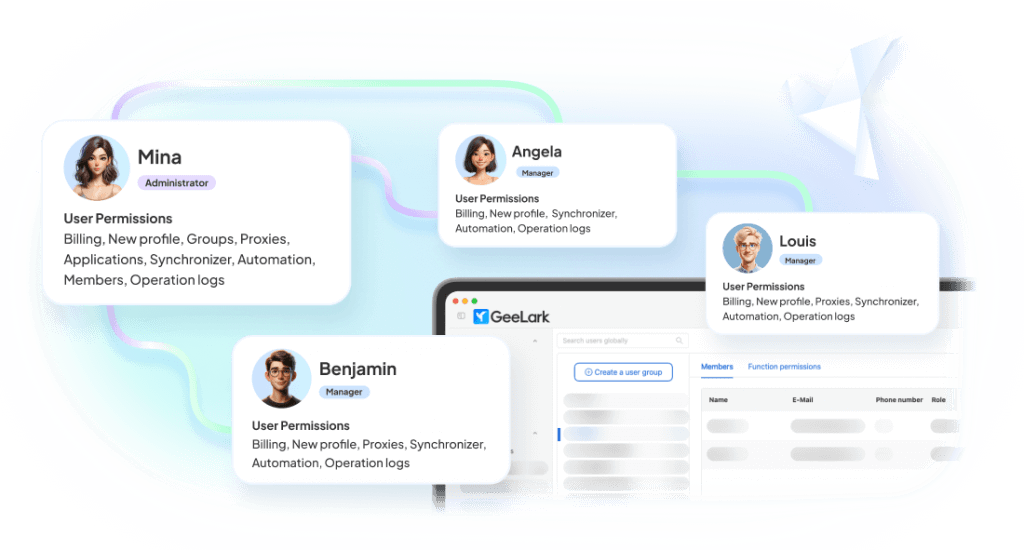
Multiple teammates need access to client and brand accounts without sharing credentials.
Hard to scale
As account numbers grow, assigning, organizing, and managing Threads accounts becomes increasingly manual.
Pain points become a single workspace
Centralized Threads workspace
Isolated cloud phone for each account
Role-based team access
Organized account groups and workflows
WHY GEELARK
Why social media teams choose GeeLark
A product-level answer to multi-account operations, not a workaround stacked on top of a browser.
A dedicated cloud phone per account
Real Android in the cloud, always on, reachable from any desktop — no hardware to buy or babysit.
Independent account environments
Separate device profile, storage, app data and network path so accounts never share a footprint.
Automation for repetitive work
Warm-up, posting and routine actions run on schedule across a whole group of accounts.
Team collaboration built in
Invite operators, scope permissions per group and hand accounts over without sharing passwords.
How GeeLark cloud phone works for Threads
GeeLark lets your team run Threads profiles inside remote Android cloud phones. Instead of managing many profiles on the same local device, each Threads account can operate in its own Android environment with separate app data, login session, proxy settings, and team access.
Your computer
Remote access to all Threads account environments
|
GeeLark workspace
Central control for profiles, cloud phones, proxies, teams, and automation
|
Isolated Android cloud phones
One cloud phone profile for each Threads account or account group
|
Threads and Instagram apps
Run Threads workflows while keeping the related Instagram login environment organized
One workspace, six working surfaces
Everything an operator touches during a normal day, in a single product.
Keep each Threads account environment separate
Threads is connected to Instagram and Meta’s account ecosystem, so account organization matters. GeeLark gives each account a real Android cloud phone environment where teams can install and use the Threads app, manage account activity, and keep workflows separated.

Automate Threads workflows
GeeLark helps teams reduce repetitive mobile tasks while keeping each account’s identity, content angle, and engagement pattern distinct.

Repeat actions across multiple cloud phones
Mirror an action from one device to many. Great for supported bulk workflows and consistent setup steps.
Bind a stable network path to each account
Attach proxies per device, check connectivity before use and keep regional consistency over time.

Assign access without sharing devices
Give teammates access to the exact cloud phones and groups they need. Roles, permissions, and audit logs included.
Create social-ready content with AI
Turn ideas into images and videos for social media using multiple leading AI models—all within your GeeLark workspace.

COMPARISON
GeeLark vs traditional multi-account solutions
Where each approach holds up, and where it stops scaling.
|
Criteria |
GeeLark |
Physical Phones |
Android Emulators |
Browser Profiles |
|---|---|---|---|---|
|
Scalability |
Instantly add cloud phones from one dashboard |
Limited by purchased hardware |
Limited by local CPU and RAM |
Easy to create, but tied to one computer |
|
Environment isolation |
Dedicated device, storage, and network for every account |
One physical device per account |
Shared system resources and fingerprints |
Browser isolation only; no mobile environment |
|
Team collaboration |
Role-based access with centralized management |
Requires handing over devices |
Restricted to a single workstation |
Credentials are commonly shared |
|
Automation |
Built-in automation and scheduled workflows |
Mostly manual or requires additional scripting |
Script-based with ongoing maintenance |
Limited to browser automation |
|
Hardware dependency |
None — fully cloud-based |
Requires devices, SIMs, charging, and storage |
Requires a high-performance computer |
Requires a powerful desktop |
|
Mobile app fidelity |
Native Android cloud environment |
Native Android device |
Simulated Android environment |
Browser-only experience |
Choose a cloud phone when:
You need native mobile apps, remote access, separate environments, team collaboration, and scalable workflows.
Choose an emulator when:
You mainly need local app testing.
Choose a multi-account browser when:
Your workflow is primarily browser-based.
Run multiple accounts on all your favorite platforms


CUSTOMER RESULTS
What changes after the switch
How teams scale with GeeLark cloud phones.
Get started in 3 simple steps
Sign up
Download
Log in to the App
FAQs
Start managing multiple Threads accounts today
Create your first cloud phones, prepare their environments and run the whole workflow before you commit to a plan.
