
Manage multiple OnlyFans accounts from one workspace
Separate browser profiles for web-based accounts
Android cloud phones for mobile-first workflows
Proxy configuration per profile
Built-in automation
Team-based access

BUILT FOR TEAMS MANAGING MULTIPLE ONLYFANS ACCOUNTS
Independent creators
Keep different creator profiles, brands, or content strategies organized in separate cloud phone environments.
OnlyFans agencies
Manage multiple creator accounts from one workspace instead of maintaining separate physical devices for every account.
Creator management teams
Assign account access to operators and keep daily workflows organized as your team grows.
Multi-brand creator businesses
Separate accounts for different brands, audiences, regions, or content strategies while keeping operations centralized.
THE PROBLEM
Why managing multiple OnlyFans accounts gets complicated
The challenge is not simply opening another account. As the number of creators, profiles, and team members grows, login sessions, browser data, proxies, credentials, and account ownership become harder to keep organized. A setup that works for two accounts can quickly become difficult to maintain at scale.
Too much account switching
Constantly logging in and out of accounts slows down daily work and makes it easier to open the wrong creator account or mix sessions.
Shared browser environments
Using multiple accounts in the same browser environment can mix cookies, cache, local storage, and other browser data between workflows.
Scattered profile information
Account credentials, proxies, notes, and ownership details often end up spread across spreadsheets, browsers, and team messages.
Team access becomes difficult
As more operators join the workflow, sharing credentials or handing over devices makes account access harder to control.
Web and mobile workflows require different tools
OnlyFans itself is primarily web-based, while creator acquisition and promotion often involve mobile-first platforms. Managing both workflows separately adds another layer of operational overhead.
GeeLark brings browser profiles and Android cloud phones into one multi-account workspace
Browser and mobile environments in one workspace
Controlled team access
Profile-level proxy settings
Scalable cloud workflows
WHY GEELARK
One workspace for your OnlyFans account environments
OnlyFans workflows do not always require a mobile device. That is why GeeLark gives you two separate profile types instead of forcing every account into the same setup. Use browser profiles when your work happens mainly on the web. Use cloud phone profiles when your workflow requires a full Android environment. Manage both from the same workspace.
Cloud phones for mobile-first workflows
Launch separate Android environments when your creator operation also depends on mobile browsing or native social media apps.
Browser profiles for web-based workflows
Create separate browser environments for individual OnlyFans accounts, with independent cookies, local storage, browser settings, and proxy configurations.
Proxy configuration per profile
Assign and manage proxy connections individually instead of routing every account through the same network setup.
Team-based access
Give team members access to the account environments relevant to their work without handing over physical devices.
CHOOSE YOUR ENVIRONMENT
Choose the right profile for each OnlyFans workflow
OnlyFans is primarily a web-based platform, so you do not need a cloud phone for every account.
GeeLark lets you choose between isolated browser profiles for web-based workflows and Android cloud phones for mobile-first operations. Both profile types can be created, organized, and accessed from the same workspace.
Browser profiles for everyday OnlyFans management
For most OnlyFans-only workflows, a browser profile is the more direct option.
Create a separate browser environment for each account so cookies, cache, local storage, login sessions, browser fingerprints, and proxy settings remain organized by profile.
BEST FOR
Cloud phones for mobile-first creator workflows
Choose a cloud phone when your workflow requires more than a browser.
Each GeeLark cloud phone runs as a separate Android environment with its own device profile, app storage, browser data, and configurable network connection.
BEST FOR
QUICK DECISION GUIDE
Browser profile or cloud phone: which should you use for OnlyFans?
The right environment depends on what your workflow actually requires.
| Your workflow | Recommended GeeLark profile |
| Log into and manage OnlyFans accounts on the web | Browser Profile |
| Keep OnlyFans cookies and login sessions separated | Browser Profile |
| Use a different proxy for each account | Browser Profile |
| Manage multiple OnlyFans creators with a team | Browser Profile |
| Use OnlyFans through a mobile Android environment | Cloud Phone |
| Run native social media apps alongside OnlyFans | Cloud Phone |
| Manage OnlyFans + TikTok/Instagram workflows | Browser Profiles + Cloud Phones |
| Manage web and mobile accounts from one dashboard | Browser Profiles + Cloud Phones |
For most OnlyFans-only workflows
Start with browser profiles. They provide the isolated browser environments needed for web-based account management without adding an unnecessary mobile layer.
For broader creator marketing workflows
Add cloud phones when your team also manages mobile-first platforms or requires complete Android environments.
You do not have to choose one system for everything. GeeLark lets browser profiles and cloud phones work side by side in the same workspace.
One workspace, two ways to manage OnlyFans accounts
Choose the environment that fits your workflow — browser profiles for web-based OnlyFans management, or cloud phones when you need a full Android environment.
Give every OnlyFans account its own isolated profile
Create a separate GeeLark profile for each account to keep sessions, browser data, and network settings organized independently.
Use a browser profile for everyday OnlyFans web workflows, or switch to a cloud phone when your operation also involves mobile-first apps and Android environments.

Automate repetitive mobile workflows
Use templates and custom tasks that run on cloud phones—no scripts to maintain, no attended sessions.

Repeat actions across multiple cloud phones
Mirror an action from one device to many. Great for supported bulk workflows and consistent setup steps.
Bind a stable network path to each account
Attach proxies per device, check connectivity before use and keep regional consistency over time.

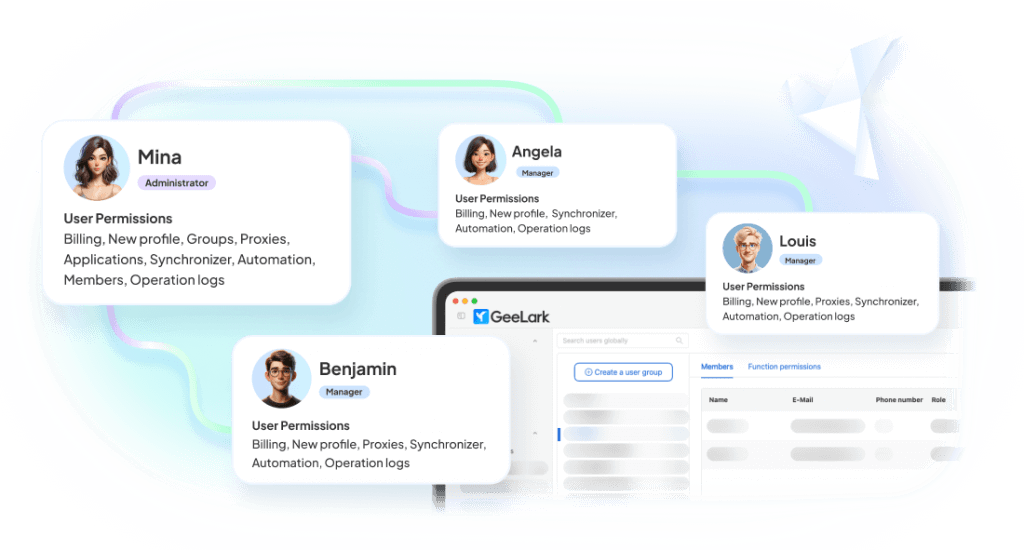
Assign access without sharing devices
Give teammates access to the exact cloud phones and groups they need. Roles, permissions, and audit logs included.
Create social-ready content with AI
Turn ideas into images and videos for social media using multiple leading AI models—all within your GeeLark workspace.

COMPARISON
GeeLark vs traditional ways to manage multiple OnlyFans accounts
Different setups can work for a small number of accounts, but they become very different once you need isolation, team access, centralized organization, or both web and mobile environments.
|
Criteria |
GeeLark |
Regular Browser Profiles |
Physical Phones |
Separate Browser + Phone Tools |
|---|---|---|---|---|
|
Separate web environments |
Yes |
Limited |
Browser-dependent |
Depends on tool |
|
Android environments |
Yes |
No |
Yes |
Depends on mobile tool |
|
Browser + mobile in one workspace |
Yes |
No |
No |
No |
|
Proxy configuration per profile |
Yes |
Manual / extension-based |
Separate setup required |
Depends on tool |
|
Profile grouping and organization |
Centralized |
Basic |
Manual |
Split across tools |
|
Team access |
Centralized |
Limited |
Device handover often required |
Split across tools |
|
Web-based OnlyFans workflow |
Browser profiles |
Yes |
Yes |
Yes |
|
Mobile-first social workflow |
Cloud phones |
No |
Yes |
Separate tool required |
|
Hardware required |
No |
Local computer |
Yes |
Depends on setup |
|
Scaling account environments |
Add profiles as needed |
Add browser profiles |
Buy more devices |
Maintain multiple systems |
Choose ordinary browser profiles when
You manage only a very small number of accounts and do not need advanced profile isolation, proxy organization, or team controls.
Choose physical phones when
You manage multiple creator accounts, need separated mobile environments, work with a distributed team, or want to reduce dependence on physical devices.
Choose GeeLark when
You need to manage multiple web-based accounts, mobile-first creator workflows, proxies, profiles, and team access without maintaining separate systems for each environment.
MORE MULTI-ACCOUNT WORKFLOWS
Manage multiple accounts across your marketing stack
Use GeeLark browser profiles and cloud phones to organize account workflows across the platforms your creator business depends on.


FAQs
Get started in 3 simple steps
Sign up
Download
Log in to the App
Manage multiple OnlyFans accounts from one workspace
Keep every account organized as your creator operation grows.
